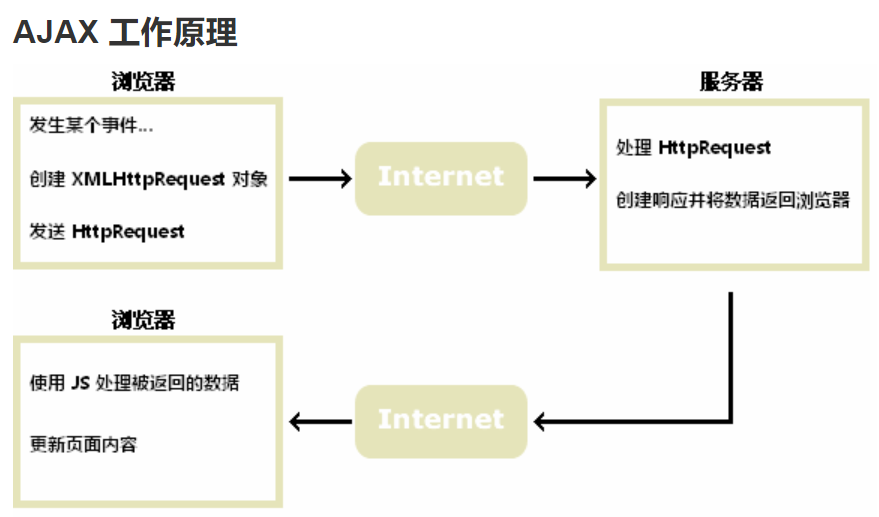
AJAX = 异步 JavaScript 和 XML。是一种用于创建快速动态网页的技术;
<!DOCTYPE html>
<html>
<head>
<script>
function cbfunc(xhr)
{
if (xhr.readyState==4 && xhr.status==200)
{
document.getElementById("myDiv").innerHTML=xhr.responseText;
}
}
function myFunction()
{
xhr=new XMLHttpRequest();
xhr.onreadystatechange=cbfunc(xhr);
xhr.open("GET","./AJAXdemo.html",true);
xhr.send();
}
</script>
</head>
<body>
<div id="myDiv"><h2>使用 AJAX 修改文本内容</h2></div>
<button type="button" onclick="myFunction()">修改内容</button>
</body>
要特别注意的是,js运行在本地浏览器,而XHR的响应是来自服务器端,二者是不同步的。某些情况下,服务器端会发送header Location来指示客户端重定向,但是浏览器上旧的内容不会被自动清空,会出现“混合页”的尴尬。实测比较靠谱的解决办法是在js里检查xhr.responseURL来分别处理。如果服务器有重定向了,则本地也显式重定向
const xhr = new XMLHttpRequest();
const urlfull='https://*****/php/uploads.php';
xhr.open("POST", urlfull);
xhr.onload = () => {
var responseText = xhr.responseText;
if(xhr.responseURL!=urlfull){
window.location = xhr.responseURL;
}else{
log.innerHTML = '上传成功,地址是:' + responseText;
}
};
const form = new FormData();
Array.from(files).forEach((file) => form.append(file.name, file));
xhr.send(form);